
Library
WELCOME TO THE LIBRARY OF HOK.
WE SUPPORT YOU WITH A WIDE RANGE OF PRINT AND E-MEDIA.
Opening Hours
-
Monday to Friday
09:00 a.m. - 8:00 p.m. -
Saturday
10:00 a.m. - 6:00 p.m.
Head of library

Katharina Juffinger, BA
Head of Library
Literature and media search
Workshops and Training
INTRODUCTION TO THE LIBRARY (ONLINE)
Duration: approx. 1 hour
In this workshop, students get to know the kubi library rooms with the help of a virtual tour. We also explain the HOK library homepage and our search engine and databases to the students. The aim of the workshop is to develop their own search strategies. We also show how information sources can be obtained, evaluated, identified and used. The processing of information using reference management programs will also be briefly outlined in the workshop.
INTRODUCTORY COURSE: WORKING WITH CITAVI (online)
Duration: approx. 1.5 hours
Citavi is a reference management tool specially designed for pieces of academic writing; academic paper. In this course, students will learn about the various functions of Citavi in order to efficiently organize and structure literature research and writing processes for seminar papers or theses. The course includes the creation of a project, source citations, citation settings and the integration of Citavi in Word. Lecturers can book the course for their courses, while individual registrations are possible for students (e-mail: bibliothek@hok.ac.at). The next available date will be communicated in the reply letter.
Video-Tutorials FOR STUDENTS VIA MOODLE:
COACHING FOR FINAL THESES (Kubi)
Meetings are organized regularly and take place at the kubi. Students from all disciplines meet to exchange experiences and motivate each other. Prof. (FH) Dr. Uwe Heil is available as a coach and has already supervised over 100 theses.
The meetings take place from 18:00 to 20:00 in the kubi. You can join and leave at any time. The offer is free of charge and does not require registration.
Questions & Answers
Information on our library
What is the kubi?
The kubi – Kufstein Library for Science & Leisure was established in 2018 through the merger of the library of the University of Applied Sciences Kufstein Tirol and the Kufstein Public Library. Operated by HOK, it supports scientific research, teaching, and studies, as well as general education, information, and leisure activities. The kubi is an organizational unit of Hochschule für Angewandte Wissenschaften Kufstein Tirol GmbH (HOK).
Who can use the library?
The library is open to everyone, regardless of whether they are affiliated with Kufstein University of Applied Sciences or where they live.
Do students need a library card?
For HOK students, the digital student ID plus the key chip serve as your library card.
How can I access my library account and what are my login details?
You can bookmark the direct login page for quick access.
Alternatively, you can log in via the library search engine by clicking "Sign In" in the top right-hand corner, or by using the "Library Account" link on the kubi website.
Login details for kubi users:
Use the email address you provided during registration, along with the default password. The first time you log in, please reset your password and choose a new one — you'll receive a link by email to do so.
What are the fees for using the library?
- External users with a valid Kufsteincard: Library access is included in the Kufsteincard at no additional cost.
- External users without a Kufsteincard: An annual fee of EUR 20 applies (reduced to EUR 10 for senior citizens, students from other universities, and people with disabilities).
- HOK students and ISK pupils: Library use is free of charge.
How can I extend the loan period?
After logging into your online library account, you'll see your name in the top right-hand corner. Click the arrow to go to the "My Loans" page, where you can renew your loans.
How can I have currently borrowed books held for me?
You can place a hold on checked-out books online. To do this, log in to your library account, then click the "Hold" button next to the book you want in our search engine. As soon as the book is returned to the library, you'll automatically receive an email notification, and we'll set it aside for you at the circulation desk.
What are the overdue fees if I overdraw my rental?
If an item is not returned or renewed on time, a late fee of EUR 1 per item applies for the first week, plus an additional EUR 5 per item for each week thereafter. Please note that we are not obligated to send a reminder before an item's due date.
How can the kubi workspaces be booked?
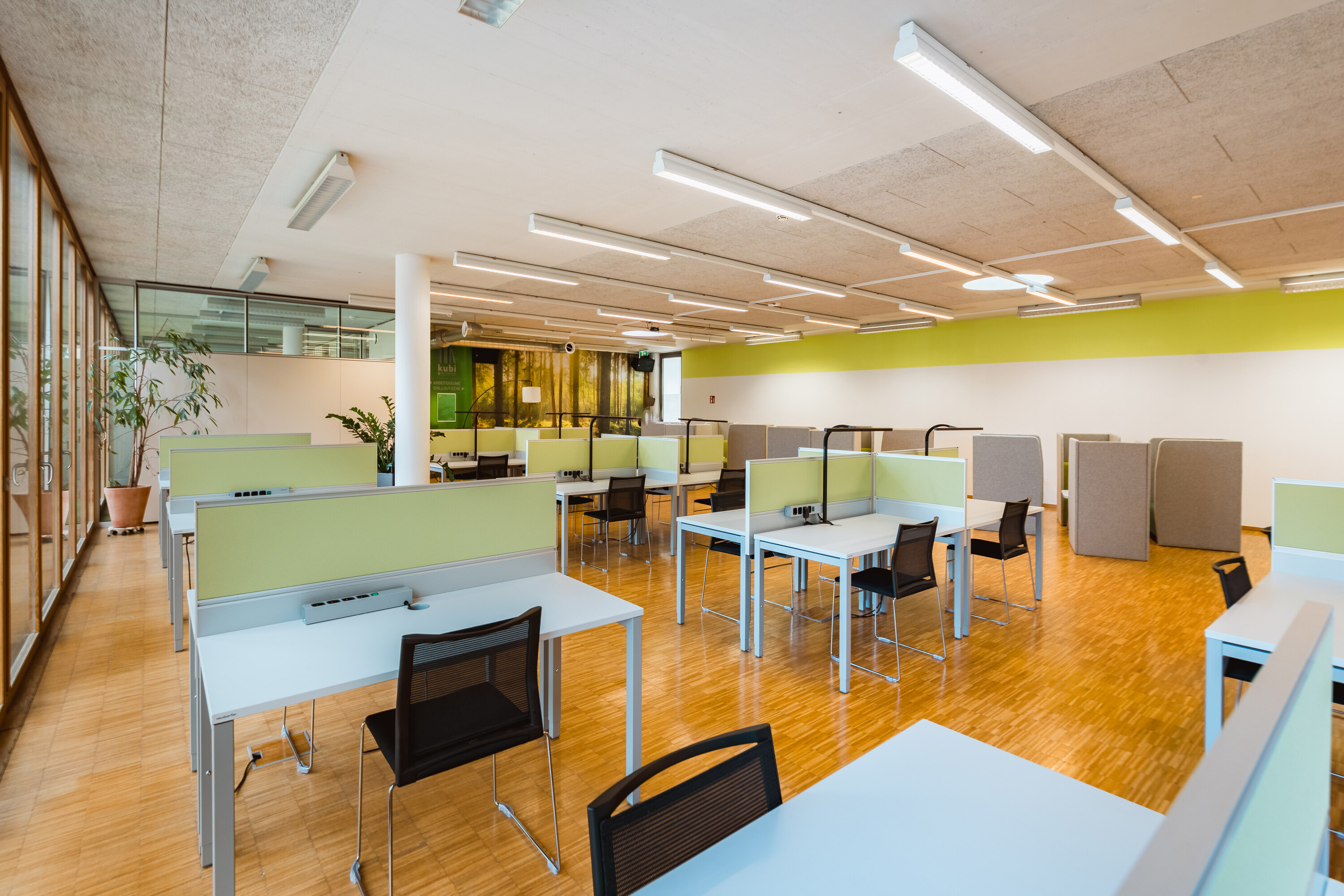
We offer three meeting rooms, seating 6, 8, and 10 people. Please reserve a room in advance by emailing Bibliothek@hok.ac.at. Key cards are available for pickup at the circulation desk. We'll charge a EUR 10 deposit to your library account, which you'll get back when you return the key.
Which media can be borrowed?
Academic textbooks and journals, novels, non-fiction books, children's and young adult books, games, audiobooks, and DVDs are available. Newspapers, as well as the most recent issue of each journal and magazine, are reference-only items and cannot be checked out.
Which items can be borrowed from the library?
The kubi rents out photo and video equipment, tablets and accessories or presentation equipment.
The equipment can be reserved in advance at bibliothek@hok.ac.at. The loan period is one week.
Photo- & video equipment
- 18-inch LED ring light Neewer SRP 18-2.4G: ring light
- Amaran LED video light
- Digital SLR camera: Canon EOS 700D
- Delamax 107 cm collapsible reflector
- GoPro Hero 3: including accessories
- Logitech Webcam C925e
- Rode Wireless GO II wireless microphone set and interview grip
- Rollei Actioncam 525 including accessories
- Memory cards
- Smartphone stabilizer Osmo Mobile 6 OE200
- Tripod
- USB microphone TIE TUR Studio Microphone
- Sony Digital 4K Video Camera Recorder
- Sony HDR-PJ 10E video camera
- Sony Vlog Camera ZV-E10
- Insta360 X3 Action Cam
- Insta360 Bullet Time Bundle Selfie Stick
Presentation equipment
- Beamer NEC M361X
- Logitech r400 Wireless Presenter
- Various adapters
Tablets & stuff
- Apple Pencil
- Dictation device : VoiceTracer
- iPad Air 16GB : iSurvey is installed
- iPad Air 64GB : iSurvey is installed
- iPad Air (4. Generation) 256 GB
- Speaker Jabra Speak 510
Calculator
- Calculator Texas Instruments : TI-30 ECO RS
How many media can be borrowed and for how long?
You can borrow up to 15 items at a time (books, magazines, audiobooks, DVDs, and games). The loan period is three weeks. You can renew an item up to three times, for another three weeks each time, unless someone else has placed a hold on it.
How do I find the media in the library?
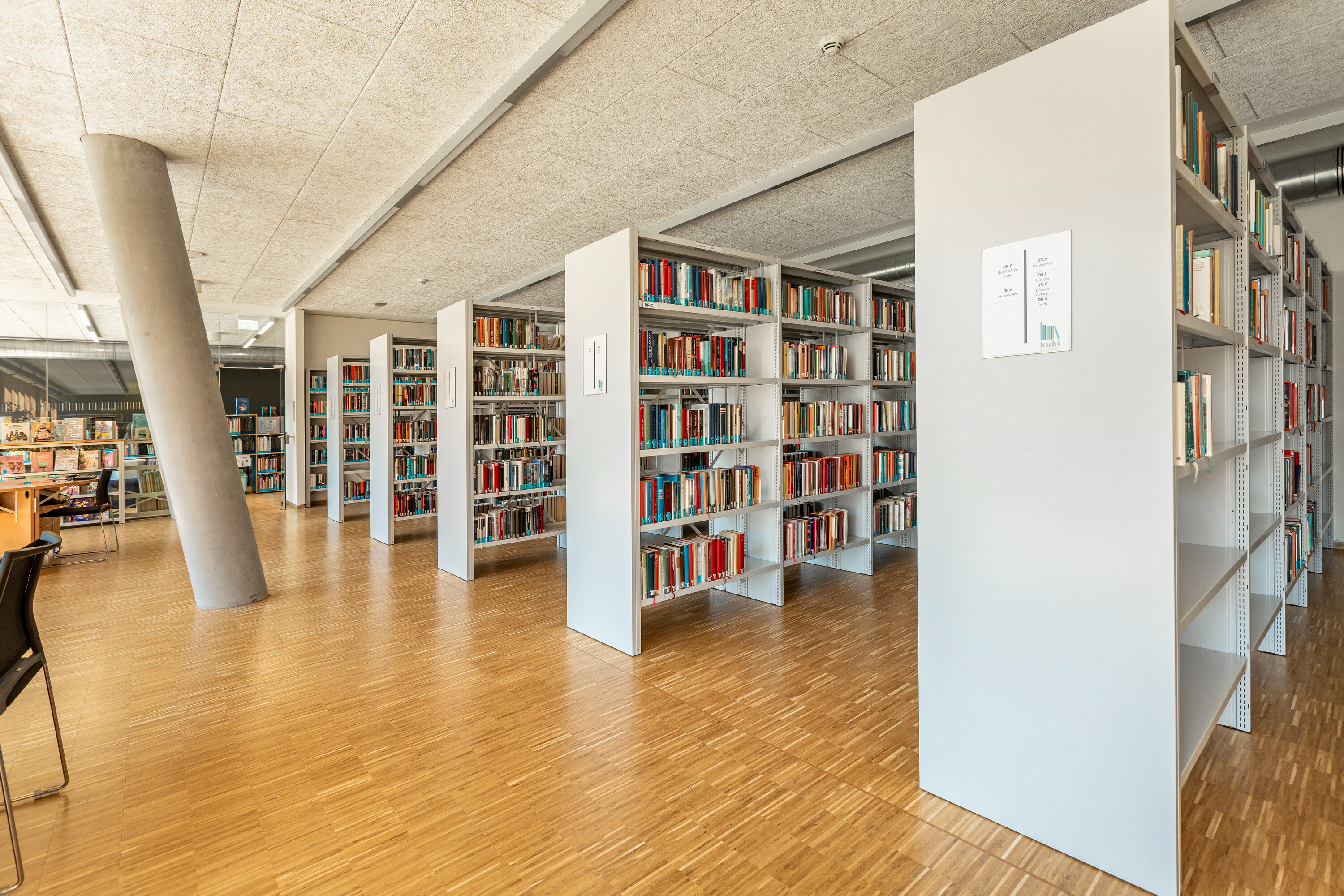
Each search result for a print book displays a call number (the code on the spine) and its location. The exact arrangement varies depending on where the item is shelved, but printed books are always arranged systematically.
Location: Building A, 1st Floor
- Fiction, Children's and Young Adult Literature, and Biographies
Call numbers indicate the section: DR stands for fiction, DR.J for young adult fiction, B for biographies, and J for children's books.
Within each section, books are sorted by genre and then alphabetically by author.
Location: Building B, 1st Floor
- Science and Nonfiction Section
The shelves in the science section are arranged systematically from A to Z.
Example: call number "QQ 000 C229." The letters indicate the subject area: "Q" stands for "Economics," "QQ" is the subcategory "Specific Economics," and the number "000" is a further subcategory, "General." The following combination of letters and numbers, "C229," is a code based on the author's name.
Additional note: the edition is shown in parentheses within the call number, and a hyphen followed by a number indicates the volume.
The nonfiction shelves are organized by subject.
- DVDs, Audiobooks, and Games
DVDs begin with the call number TT and are arranged alphabetically by genre and title. Children's DVDs have the call number TT.J.
Audiobooks have the call number TD, or TD.J for children's audiobooks, and are sorted alphabetically by genre and author. Tonie audio figures are sorted numerically.
Children's games are sorted by age group; all other games are sorted by genre.
Where can I find print magazines and newspapers?
Print journals are organized into two areas. The Media Lounge houses public library journals, which can be checked out (except for the most recent issue). You'll find academic journals in Building B.
Daily and weekly newspapers are also located in the Media Lounge, but these cannot be checked out.
Can I recommend a book to the library for purchase?
Suggestions are always welcome.
You can fill out the "Suggest a Purchase" form on our website or through the search engine. Forms are also available at the library. We'll notify you by email once we've reviewed your suggestion and let you know when the item will be available.
What is Onleihe?
Onleihe Tirol is a digital portal run by the Tyrolean libraries that lets you borrow a wide range of eBooks, eAudiobooks, and ePapers, including children's and young adult literature, fiction, and non-fiction. Titles can be downloaded directly in your browser or through the app on a smartphone, tablet, or e-book reader, and can be read for the duration of the loan period. The service is free for all registered library users.
Activation: kubi users with a valid library account can request a free Onleihe account by email, phone, or in person. Your Onleihe account will be activated within 48 hours, after which you can start borrowing. The maximum loan period is three weeks, after which items are returned automatically. If a title isn't available because it's already checked out, you can place a hold on it. You'll be notified by email as soon as the title becomes available again.
How does the Library Search Engine work?
Our search engine is your central starting point for all searches. It lets you search all available media with a single query, including our licensed databases (with the exception of Austrian Standards, MarketLine, Statista, PressReader, The New York Times, EZB, ...), e-books, and e-journals.
To refine your search, you can use criteria such as type, year of publication, language, and publisher. Be sure to check out the additional options in the left-hand menu as well.
How do I find a thesis in the library or search engine?
Theses submitted starting in 2022 (i.e., from the 2020 academic year onward) are available online and can be viewed through the library search engine. They can be found in the Master's Theses/Semester Papers collection, sorted by degree program.
Please note: you must be logged in to your library account to access these files.
The 2020–2021 volumes (= 2018–2019 academic years) are shelved by degree program in the reading room. All master's theses through 2019 are archived and must be requested by email at bibliothek@hok.ac.at.
- Signature: M + course code + academic year / number
- Example: M-DIM 16/8
For printed master's theses, we recommend using the index search in the library search engine: select the "Signatures" index and look up the corresponding signature (see example above).
Please note that printed theses cannot be checked out and may only be viewed in the library.
How do I find an e-book?
You can search for e-books using our central search engine. Once you've entered a search term, you can refine your results using the filters on the left. For example, the "Limit to Online Resources" filter shows only digital items.
You can also search for e-books directly in our licensed databases, which usually offer similar filtering options.
How can I get access to the e-journals?
You can find e-journals, like all other e-resources, through our search engine. To refine your search, simply limit the results to "e-journal."
You can also search for e-journals in the Electronic Journals Library (EZB) and the WISO journal database.
How does the database search work?
Our library search engine lets you search numerous databases without needing a separate login. You can find the databases in our search engine's collection. In some cases, you may need to log in using an email address (PKZ@stud.hok.ac.at) and a default password. You can find more information on the login process under each individual database.
Which workshops and trainings can be booked for free?
Library Introduction (Online)
Duration: approx. 1 hour
Students receive a comprehensive introduction to library resources, including the HOK homepage, search engines, and databases. The goal is to help students develop their own search strategies and learn to identify, evaluate, and effectively use information sources. Instructors can book this workshop for their courses, and students can also sign up individually (email bibliothek@hok.ac.at). The next available date will be announced upon registration.
Introductory Course: Academic Writing with Citavi (Online)
Duration: approx. 1.5 hours
Citavi is a reference management tool designed specifically for academic work. In this course, students learn how to use Citavi's many features to efficiently organize and structure their research and writing for seminar papers or theses. The course covers creating a project, citing sources, setting up citation styles, and integrating Citavi with Word. Instructors can book this course for their classes, and students can also sign up individually (email bibliothek@hok.ac.at). The next available date will be announced upon registration.
Introductory Course: Academic Writing with Zotero (Online)
Duration: approx. 1.5 hours
Zotero is a reference management tool designed specifically for academic work. In this course, students learn how to use Zotero's many features to efficiently organize and structure their research and writing for seminar papers or theses. The course covers creating a project, citing sources, setting up citation styles, and integrating Zotero with Word. Instructors can book this course for their classes, and students can also sign up individually (email bibliothek@hok.ac.at). The next available date will be announced upon registration.
Video Tutorials for Students via Moodle:
Does the library offer thesis coaching?
The kubi organizes regular meetings where students from all fields of study can share experiences and motivate one another. Prof. (FH) Dr. Uwe Heil is available as a coach and has already supervised more than 100 theses.
Meetings take place from 6:00 p.m. to 8:00 p.m. at kubi. You're welcome to join or leave at any time. Attendance is free, and no registration is required.
Upcoming dates will be announced.
Which literature management programs does kubi recommend?
The kubi recommends Citavi and Zotero as citation management tools. Citavi is available free of charge to all students as well as HOK staff. Zotero, by contrast, is a freely accessible, open-source program. Both tools help you cite sources correctly, build bibliographies, and organize your research.
Citavi
What is Citavi?
Citavi is bibliography management software designed specifically for academic work. It helps you organize and structure your research as well as your writing process, and lets you customize citation styles and formatting. You can also create and assign tasks, which is especially useful for research groups.
Installing and Using Citavi
Before using Citavi for the first time, you'll need to install it (note: not compatible with Apple devices).
Download: Free version of Citavi
To register, you must create a Citavi account using your HOK email address.
Getting Started
Open Citavi, click "My University," select "HOK," and log in with your HOK email address and personal password. You'll need to confirm your email address once.
Create a Project
You can create a new project using the purple plus icon. You'll then need to choose whether to save it locally, on your own computer, or in the cloud. Saving to the cloud is especially useful when several students or researchers are collaborating. Citavi is organized into three main sections:
- The "Literature" section lets you manage both metadata and content from books, academic articles, films, and more. A list of items you've already added appears on the left, with the main workspace in the center, where you enter citations, work details, and author information. You can add items in several ways: by identifier (ISBN, ISSN), by selecting them from the library catalog, or by entering the data manually. On the right side, you'll also find detailed guidance for each section, as well as a preview.
- The "Knowledge" section lets you organize and structure your research.
- The "Tasks" section covers planning your research process. Here you can set goals and enter deadlines. You can also divide tasks among team members if several students are collaborating on the same academic paper.
For further information, see the Introduction to Academic Work with Citavi course. Instructors can arrange individual sessions with the kubi team for their students, and students can also sign up for Citavi training (see Workshops and Trainings).
Zotero
Installing and Using Zotero
To install Zotero, first download it here. Once installation is complete, you can open the program from the Start menu.
Creating a Project
Zotero offers many of the same features as Citavi, though under different names. Literature is managed in the "Library," while the "Notes" section serves a function similar to "Knowledge" in Citavi. You can add new entries using the green plus icon or the magic wand. On the right side of the screen, you can edit entries and add metadata. Zotero also lets you insert citations, summaries, and references directly into your word processor, automatically enabling a dedicated field for this information.
What is predatory publishing and how can you protect yourself?
The number of scientific journals and publishing opportunities has grown significantly in recent years. At the same time, fraudulent scientific publications have also been on the rise. Predatory publishing is a deceptive business model: predatory publishers claim to publish legitimate scientific journals, often in the form of e-journals, but forgo quality control and standard peer review, even though they charge authors substantial fees. Graduates and early-career researchers, who often have little experience publishing in academic journals, are especially likely to fall for these offers. This has several negative effects on the scientific community: the published results fail to reach the field, are dismissed as unreliable, and damage the reputation of both the authors and science in general.
A distinction should be made between predatory publishers, predatory journals (so-called "fake journals"), and predatory conferences, where entire fake conferences are staged.
Caution is also warranted with publishing services (e.g., GRIN, AV Akademikerverlag, Shaker Verlag, etc.) that offer to publish academic papers. Through mass mailings, these publishers offer to publish graduates' seminar papers, bachelor's theses, and similar work. This is not advisable: authors often forfeit their copyright and lose the chance to have their work published later by a reputable publisher.
The following list of criteria can help you assess the credibility of a publisher or journal:
- The journal or publisher is well known in your field.
- The journal's scope is clearly defined and stated.
- The publisher is a member of a recognized association (OASPA, DOAJ, COPE, etc.).
- Communication with the publisher is professional and legitimate.
- All relevant information (editorial board, contact persons, contact details, etc.) is presented transparently on the website.
- The website is free of technical, grammatical, and spelling errors.
- Peer review is standard practice for this journal or publisher.
- The peer-review process is clearly and transparently described.
- Publication costs or APCs (Article Processing Charges) are clearly stated on the website.
- The journal has an ISSN or DOI.
- The journal or publisher is not listed here: https://www.predatoryjournals.org/
If you have questions about predatory publishing or are unsure about a publisher's offer, the kubi library team is happy to help.